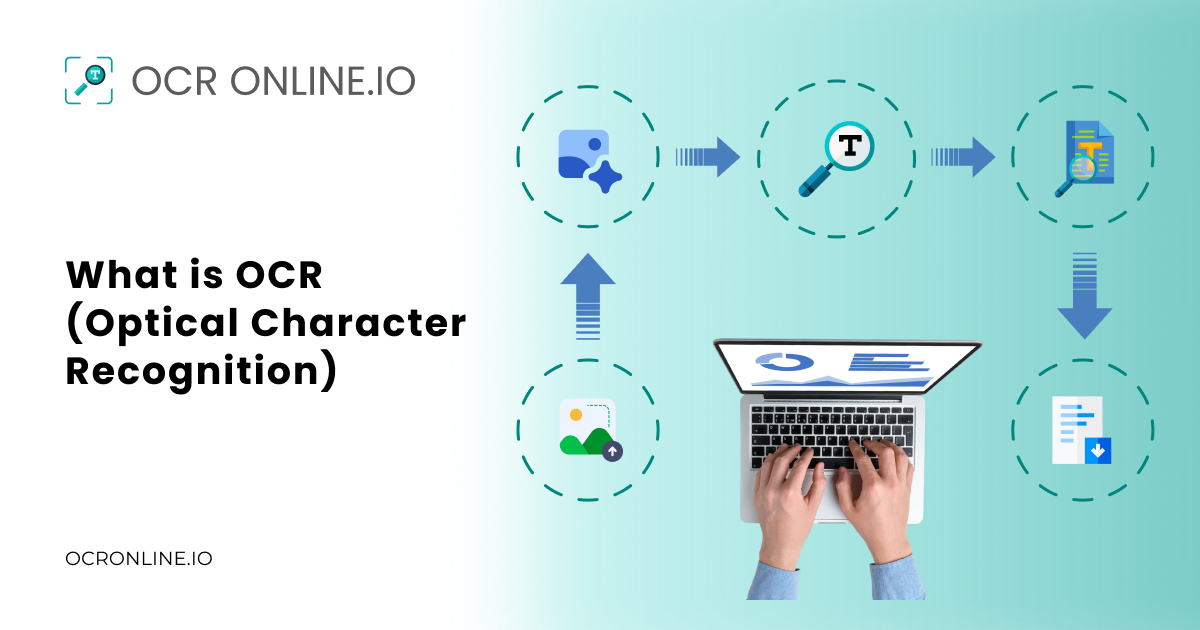
OCR is a popular technology that converts images of text or scanned pages into machine-readable text. For example, if you have a scanned page from a book or someone sends you a picture of it. Your device, i.e., a computer or mobile, will treat that as an image file that you cannot edit or search words inside it.
OCR can read those words and turn them into digital text that you can copy, edit, search, and store. Advanced OCR technology also works with PDF files and handwritten text.
What Does OCR Mean?
OCR means Optical Character Recognition. You may also see people call it text recognition or text extraction.
For a better understanding of OCR, you can break the full form of OCR into three parts:
- Optical means the system looks at visual content, such as an image or scan.
- Character means letters, numbers, and symbols.
- Recognition means the system finds and identifies those characters.
OCR takes text that exists as part of an image and turns it into usable digital text. Here are some common examples:
|
Input |
What OCR Does |
Output |
|
Scanned paper |
Reads printed words |
Editable text |
|
Receipt photo |
Reads words and numbers |
Digital text or data |
|
Image-based PDF |
Recognizes the text |
Searchable text |
|
Screenshot |
Extracts visible words |
Copyable text |
|
Handwritten forms |
Tries to read handwriting |
Digital text |
A Simple Example of OCR
To better explain OCR to you, here we are going to provide you with a little demonstration. Suppose you have an image of an invoice like the one we have attached below.
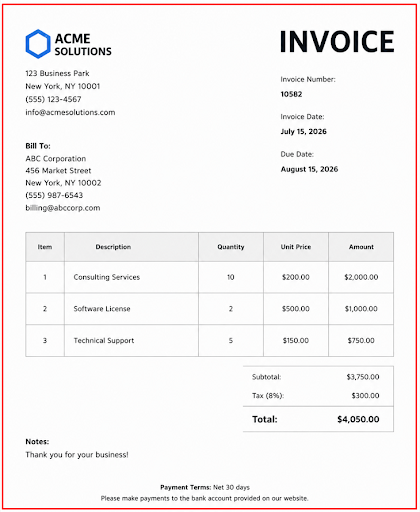
As you can see, the image contains text with a mix of alphabets and numbers with different formatting and font styles. In the current form, it is just an image file for the device you are using. Your device does not know what the text inside is. You cannot reach the image by searching for that text, nor can you edit or copy it.
Now we are going to run this image through OCR Online and convert it into digital text.
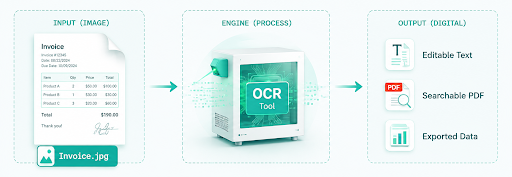
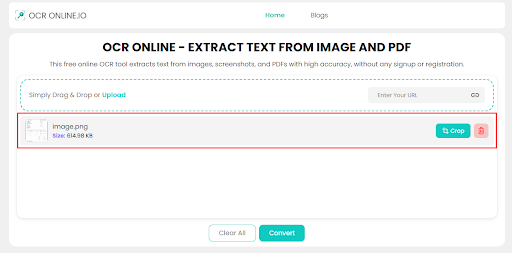
Step 1. We uploaded the Image to OCR Online.
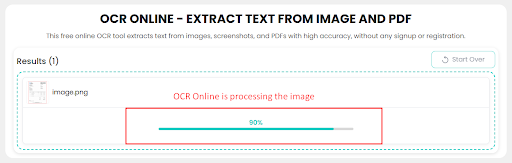
Step 2. We initiated the OCR conversion by clicking the Convert button.
Step 3. OCR Online extracted the text and provided us with the following results.
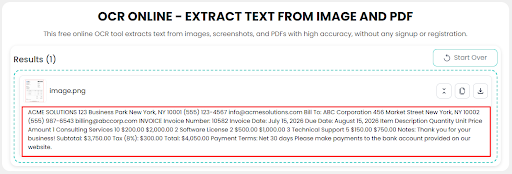
Now, we can copy or download this text as a digital file. The benefits:
- Text is digitized
- Text is editable
- Text is searchable
How Does OCR Work?
Modern OCR works on the principles of computer vision and machine learning. The short explanation is that machine learning is used to teach computers how to understand patterns in images. In OCR, these patterns are obviously characters/letters.
When an image is provided to a computer for OCR, the following processes happen to extract the text.
1. Image Preprocessing
In this process, the image is prepped before being fed to the OCR engine. Prepping means doing things like:
- Deskewing- making the text in the image upright if it is at an angle
- Noise removal- editing out any stray particles and artifacts that will lead to bad OCR.
- Binarization- turning the image into black and white, so that the text appears clearly against the background.
This happens quite fast if you have a really powerful computer or if you are using a tool that is delegating the processing to a server via cloud computing.
2. Text Extraction
This is where the text is actually extracted. Different techniques are used to recognize the text and extract it. The two most commonly used techniques are:
- Pattern recognition: where letters are recognized based on their overall shapes.
- Feature extraction: where letters are recognized based on the collection of their features (i.e., an “H” is two parallel lines intersecting at a point).
These techniques may be used alone or together; however, most modern OCR tools use both so that all kinds of text can be recognized.
3. Post Processing
Post-processing is required because OCR is not 100% accurate all the time. Sometimes, tricky fonts like cursive or bad handwriting can be misrecognized.
In modern OCR, Natural Language Processing (NLP) engines are used to make sure that the extracted text is not gibberish. NLP engines can spot grammar or spelling mistakes. It can also understand whether the mistakes are intentional or unintentional and respond accordingly.
What Types of OCR Are There?
Today, OCR technology uses different types of text recognition methods.
|
Technology |
Full Name |
Primary Focus |
Ideal Use Case |
|
OCR |
Optical Character Recognition |
Machine-printed text |
Books, invoices, scanned PDFs |
|
ICR |
Intelligent Character Recognition |
Handwritten characters |
Form fields, class notes |
|
IWR |
Intelligent Word Recognition |
Full cursive/connected words |
Unsegmented handwriting, letters |
|
OMR |
Optical Mark Recognition |
Shapes, bubbles, and ticks |
Multiple-choice exams, surveys |
Simple OCR
Simple OCR mainly recognizes printed characters. They compare the characters inside the image with patterns stored in its database. This method can work well when documents use clear fonts and simple layouts.
Intelligent Character Recognition (ICR)
ICR focuses more on handwritten characters. It can use machine learning or deep learning to recognize different writing styles. Therefore, it can handle some tasks that simple OCR finds difficult. However, handwriting can still create problems, especially when it is messy or unclear.
Intelligent Word Recognition (IWR)
IWR recognizes complete handwritten words instead of focusing only on individual characters. It helps systems process handwritten documents well enough.
Optical Mark Recognition (OMR)
OMR works differently from normal OCR. It looks for marks and selections rather than normal text.
For example, schools can use OMR to read filled bubbles on multiple-choice answer sheets. Businesses can also use it to process surveys and forms with checkboxes.
Traditional OCR vs AI OCR
Modern OCR can use:
- Machine learning
- Deep learning
- Neural networks
- Computer vision
- Language models
|
TRADITIONAL OCR |
AI OCR |
|
📄 Rule-based pattern matching |
🧠 Neural networks & Machine Learning |
|
☀️ Requires clean, high-contrast scans |
🔍 Handles shadows, blur & noise |
|
🔤 Works best with standard fonts |
✍️ Reads complex fonts & handwriting |
|
📐 Strict layout dependencies |
🌐 Adapts to dynamic/unstructured layouts |
OCR vs ICR - What’s Better?
What Are The Uses of OCR?
Nowadays, OCR is used in a lot of places for important things like the following.
-
Verification of documents in banks, airports, and government offices.
-
Data entry automation in hospitals, banks, government offices, etc.
-
Digitizing printed or written books and papers.
-
Preserving historical records.
-
Used in traffic monitoring systems to recognize license plate numbers.
-
Real-time translation of written text from other languages.
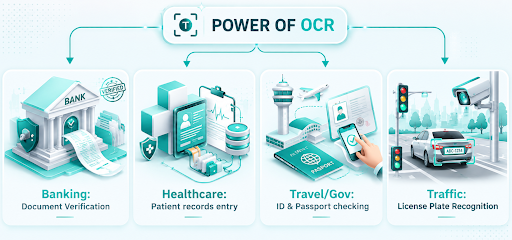
These are some of the common uses of OCR in the modern world. Before OCR, all of these things had to be done manually. Therefore, they took a lot of time and effort. With OCR, these processes are now completed quickly and efficiently, causing minimal inconvenience.
Conclusion
OCR (Optical Character Recognition) is the technology that helps you convert the text found inside images into digital text. Once converted, you can copy, edit, and search the text.
Today, OCR technology uses various types of recognition methods. Each process extracts information that would otherwise remain part of an image. Modern types of OCR can also recognize handwriting and multiple languages.