PDF to OCR Converter
Our free PDF to OCR converter makes scanned PDFs searchable and selectable online. It uses advanced OCR to convert PDF scans into searchable PDF with high accuracy.Upload Up to 5 PDF, max 4 MB Each
Results
Related Tools


OCR PDF - Convert Scanned PDF to Searchable PDF
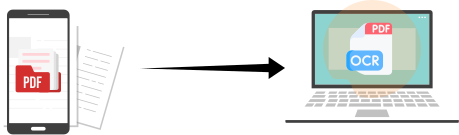
OCR Online brings you the most efficient, free OCR PDF converter. Our PDF to OCR converter helps you convert scanned, image-based PDFs into searchable and selectable PDFs in just a few clicks.
Just upload a non-searchable PDF or scanned PDF documents to it. It performs PDF OCR online for free, making PDF searchable instantly and accurately, without requiring installation or registration.
For conversion, this OCR PDF tool uses the latest optical character recognition (OCR) technology and advanced AI algorithms to recognize text in scanned PDF files. It makes it easy to search, select, and copy content from any PDF.
How to Convert PDF to OCR?
Can’t select the text in your PDF Scan? Our PDF OCR Converter makes the conversion of non-searchable PDF files to searchable PDF files quite simple. Follow these steps to convert PDF to OCR:
- 1
Open our PDF to OCR Converter.
- 2
Upload one or more scanned or image-based PDF files.
- 3
Click the “Convert PDF” button to initiate the conversion process.
- 4
Wait a few seconds while the tool recognizes the text and creates a searchable PDF.
- 5
Now, download your searchable PDF without any watermark.
-
That’s how simple it is to get a searchable PDF with our PDF to OCR tool.
Features of Our OCR PDF Converter
Our tool quickly converts image-based PDFs into text-readable PDFs that can be searched and copied. The following are some prominent features of our PDF to OCR converter.
With our tool, you can convert non-selectable PDF scans to selectable and searchable PDF online for free. You do not need to install anything, nor have to pay for a premium subscription.

Whether the PDF files contain scanned pages or images with handwritten text, our tool accurately recognizes the text and converts it into OCR PDF with high accuracy.
Our tool supports batch conversion of PDFs to OCR. You can make multiple PDF files (up to 5 at once) searchable, with a maximum file size of 4MB per file.
Our tool also lets you convert publicly available scanned PDFs on the internet to a searchable PDF. For this, you have to input the URL into the Add URL field and click “Convert PDF”.

Our OCR PDF tool is designed to be compatible across all devices. You can use it to make PDF searchable using smart devices such as a mobile, tablet, or desktop.

If you have PDF files with scanned pages or low-quality images, no need to worry. Our advanced OCR PDF tool can process them, reduce recognition errors, and convert scanned PDFs to searchable PDFs.
Benefits of Converting PDF to OCR
Converting a scanned PDF into a searchable PDF makes documents easier to search, copy, archive, and access across different devices. It improves how you use, share, and manage your documents.
Here are some practical benefits of converting image-based PDFs into searchable PDFs:
 Search text instantly
You can find words or phrases inside the PDF within seconds instead of scrolling page by page.
 Copy and Reuse Content Easily
You can select, copy, and paste text from the PDF into emails, documents, or reports.
 Update Documents
You can make scanned PDFs searchable and selectable, making it easier to edit them via a PDF editor.
 Improve Document Accuracy
Searchable PDFs reduce manual typing errors when working with scanned text.
 Digitizing Notes
You no longer need to retype content from scanned PDFs, which speeds up daily tasks.
 Improve accessibility
Screen readers and other assistive tools will be able to read text in searchable PDFs.
Frequently Asked Questions
To convert a non-searchable PDF into a searchable PDF. Use an online PDF to OCR converter; follow the process as mentioned, like uploading the file and clicking the button. Within seconds, the tool processes the file and provides an OCR PDF, which you can download. It’s that simple to convert PDF to a searchable PDF for free.
Yes, when you convert a PDF to OCR, your text becomes machine-readable. It enables you to easily search for text inside and select it.
The most efficient way to OCR a PDF without Adobe is to use an online PDF to OCR converter. They will make your PDF file searchable so that you can further edit it using a PDF editor.
Yes, our OCR PDF converter can recognize text from scanned pages, images, and many handwritten documents. It efficiently converts scanned PDFs with images or handwritten texts into searchable PDF files for free.
One of the easiest ways to OCR a PDF is to use our PDF to OCR converter online. It is fast, efficient, and makes PDFs searchable with high accuracy.
Once you successfully get the OCR PDF file, open it with any suitable PDF reader and use “Ctrl + F” (Windows) or “Cmd + F” (Mac) to search for words and phrases.